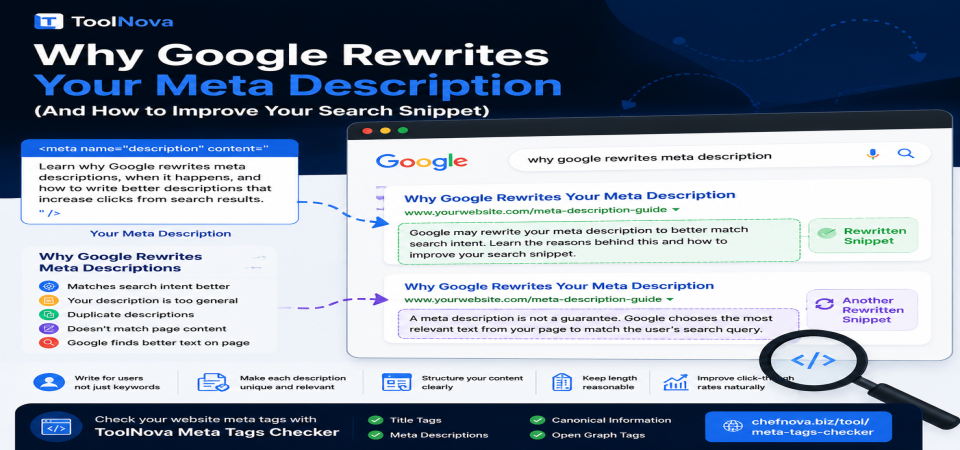
Why Google Rewrites Your Meta Description (And How to Improve Your Search Snippet)
You carefully wrote your meta description. You made it clear, relevant, and within the recommended length. But when you search for your page on Google, the description shown below your title is completely different.
Instead of the text you created, Google displays a sentence taken from another part of your page — sometimes from a section you did not expect to appear at all.
This situation is common, and it does not necessarily mean something is wrong with your website. Google is not ignoring your work by mistake. It is making a decision based on what it believes is the most useful answer for a specific search query.
Understanding why this happens helps you create better metadata and improve how your pages appear in search results.
The Meta Description Is a Suggestion, Not a Command
Many website owners think the meta description is a fixed text that Google must display. In reality, it works differently.
The meta description is a suggestion that helps search engines understand your page. Google may use it when it believes the description accurately represents the content and matches what users are searching for.
However, Google can create a different snippet using text from your page if its systems determine that another section provides a better answer for the search query.
For example, a page about SSL problems may have a general description explaining HTTPS security. But if someone searches:
"Why is my SSL certificate expired?"
Google may display a sentence from the section discussing expired certificates because it directly answers the user's question.
The description was not rejected. Google simply selected a more specific answer.
When Google Usually Uses Your Meta Description
Google is more likely to display your written description when:
- It accurately summarizes the page content.
- It is unique and written specifically for that page.
- It matches common search queries related to the topic.
- It is written naturally for users instead of being filled with keywords.
A good meta description helps users understand what they will find before clicking.
Why Google Rewrites Meta Descriptions
1. The Search Query Needs a More Specific Answer
One of the biggest reasons Google changes descriptions is search intent.
A single page can rank for many different searches. Your meta description can only provide one general summary, but Google tries to match the exact question a user typed.
For example:
A page titled:
"Complete Guide to Website Security"
may appear for searches about:
- SSL certificates
- HTTPS errors
- Website vulnerabilities
- Browser security warnings
Google may choose different text from the page depending on the search.
2. Your Meta Description Is Too General
Descriptions such as:
"Learn everything about website security and improve your online presence."
do not provide much information.
They do not tell users what they will actually learn.
A stronger description explains the specific value:
"Learn why websites show SSL security warnings, discover common HTTPS problems, and find practical solutions to fix certificate and configuration issues."
Specific descriptions are more useful for both users and search engines.
3. The Description Does Not Match the Page Content
If your meta description was written months ago and the page has changed, Google may decide that the description no longer represents the actual content.
For example, if your description says:
"Learn basic SEO tips."
but the article has become a detailed technical guide about indexing problems, Google may create a different snippet from the article itself.
Keep your metadata updated whenever major changes are made to your pages.
4. Duplicate Meta Descriptions Across Multiple Pages
Using the same description on many pages reduces its usefulness.
Each important page should have its own description explaining its unique purpose.
Common examples of duplicate descriptions include:
- Automatically generated CMS descriptions.
- Category pages using identical text.
- Product pages with only the product name changed.
Unique descriptions give Google better information about each page.
What You Can Do to Improve Your Search Snippet
You cannot force Google to always display your exact description, but you can increase the chance that it will.
Write for Users First
Avoid writing descriptions only for search engines.
A good description should answer:
- What is this page about?
- Why should someone click?
- What problem does it solve?
Keep Your Description Clear and Natural
Avoid:
- Keyword stuffing.
- Unnecessary symbols.
- Repeated phrases.
- Marketing language without meaning.
Google prefers descriptions that clearly explain the page.
Make Important Answers Easy to Find
Because Google may take text from your page, your content structure matters.
Use:
- Clear headings.
- Short explanatory paragraphs.
- Direct answers to common questions.
A well-organized article gives Google better options when generating snippets.
How to Check Your Meta Tags Correctly
Before assuming Google is changing your description because of a search issue, first confirm that your page metadata is actually configured correctly.
Common technical problems include:
- Missing meta description tags.
- Empty descriptions generated by a CMS.
- Duplicate tags.
- Incorrect canonical information.
You can check your live page metadata using ToolNova's Meta Tags Checker:
https://chefnova.biz/tool/meta-tags-checker
The tool helps review important page elements such as:
- Title tag.
- Meta description.
- Canonical URL.
- Open Graph information.
This allows you to confirm that your website is sending the correct information before investigating Google's snippet behavior.
Does a Changed Meta Description Affect SEO Rankings?
No.
The meta description itself is not a direct ranking factor. Google does not rank a page higher simply because it has a specific description.
However, the snippet shown in search results can influence whether users click your result.
A useful and accurate snippet can improve click-through rates because users better understand what they will find on your page.
Frequently Asked Questions
Why does Google ignore my meta description?
Google does not always use the description you provide. It may replace it with text from your page when that text better matches the user's search query.
Can I force Google to display my exact meta description?
No. You can optimize your description and improve the chances that Google uses it, but Google controls the final snippet displayed in search results.
Should I still write meta descriptions?
Yes. A well-written description helps search engines understand your page and helps users decide whether your result is relevant.
How long should a meta description be?
There is no official fixed limit, but many descriptions work well when they are around 150–160 characters and place the most important information near the beginning.
Final Thoughts
A changed Google snippet is not always a sign of an SEO problem. In many cases, Google is simply trying to show users the most relevant answer for their search.
The goal is not to force one fixed description to appear everywhere. The better approach is creating accurate metadata and useful content that gives Google strong options when generating search results.
By writing clear descriptions, improving page structure, and regularly checking your metadata, you increase the chance that your pages appear with snippets that represent your content correctly.




&media=https://chefnova.biz/assets/images/frontend/blog/6a8a0dd774dfa1787432407.png)