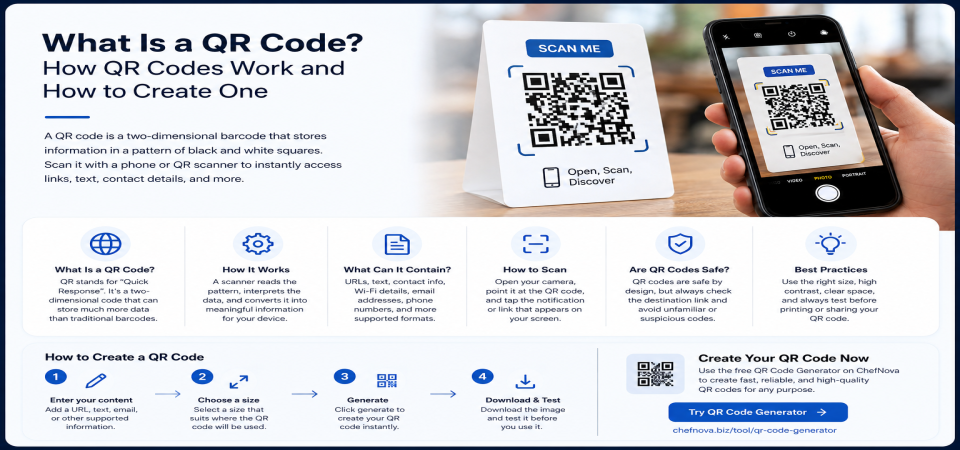
What Is a QR Code? How QR Codes Work and How to Create One
You have probably scanned dozens of QR codes without giving much thought to how they work. You may see them on restaurant tables, product packaging, posters, business cards, or event tickets.
A QR code provides a simple way to connect something physical to digital information. Instead of typing a long web address or manually entering contact details, a person can scan a small square pattern with a phone and access the encoded information.
But what exactly is a QR code? How does it store information, what can you put inside one, and how can you create a QR code that actually works when printed or displayed?
This guide explains the basics and covers the practical details that matter when creating and using QR codes.
What Is a QR Code?
QR stands for Quick Response.
A QR code is a two-dimensional barcode made up of a pattern of small squares, often called modules. The pattern stores data in a format that a compatible camera or scanner can interpret.
The main difference between a QR code and a traditional barcode is how information is arranged.
A traditional one-dimensional barcode stores information along a single direction using lines of different widths and spacing. QR codes use both the horizontal and vertical dimensions, allowing them to store more information in a compact square format.
The two-dimensional design also makes QR codes readable in different orientations, which is one reason they are convenient for everyday use.
How Do QR Codes Work?
At a basic level, a QR code is a visual representation of encoded data.
The black and white modules are arranged according to a defined structure. When a phone camera or QR scanner detects the pattern, it identifies the structure of the code and decodes the stored information.
Several parts of a QR code play an important role.
Position Markers
The three large square patterns near three corners of a QR code help the scanner identify the code's orientation.
This allows the scanner to understand how the code is positioned even when it is rotated.
Error Correction
QR codes include built-in redundancy that can allow a scanner to recover the encoded information when part of the code is damaged or obscured.
This is one reason a QR code may still work when a small portion of its surface is scratched or covered.
However, error correction does not make a QR code indestructible. Severe damage, poor printing, distortion, or insufficient contrast can still make scanning difficult or impossible.
Data Area
The remaining modules contain the encoded information.
Depending on the type of QR code and the data being encoded, that information could represent a website address, text, contact details, or another supported data format.
The scanner essentially performs the reverse of the generation process: it reads the visual pattern and reconstructs the information stored inside it.
What Can a QR Code Contain?
QR codes can be used to encode different types of information, depending on the generator and the scanning software.
Common examples include:
- URLs — directing someone to a website or specific webpage
- Plain text — displaying a message or other text after scanning
- Contact information — sharing details that can be saved to a phone
- Wi-Fi information — allowing compatible devices to use encoded network credentials
- Other structured data — depending on what the generator and scanner support
Not every QR code generator supports every possible format.
If you are creating a QR code for a specific purpose, check what the generator supports before relying on it. The same applies to the device or application that will be used to scan the code.
How to Create a QR Code
Creating a QR code is straightforward when you use an online QR code generator.
You can use the QR Code Generator on ChefNova to turn supported content into a scannable QR code.
The general process is:
- Enter your content. Depending on the tool, this may be a URL, text, email address, phone number, or another supported type of information.
- Choose an appropriate size. Consider where the QR code will be displayed. A code printed on a business card has different requirements from one displayed on a large poster.
- Generate the QR code.
- Download the generated image.
- Test the code before publishing or printing it.
Example: Creating a QR Code for a Website
Suppose you want to make it easier for people to visit your website.
Enter the complete website address into the QR code generator, generate the code, and scan it with your phone.
Before distributing the QR code, make sure it opens the correct page.
This simple test can catch problems such as a mistyped URL or an incorrect destination before the code reaches customers or visitors.
How to Scan a QR Code
Most modern smartphones can recognize QR codes directly through the camera.
The general process is simple:
- Open your phone's camera.
- Point the camera at the QR code.
- Keep the code visible and reasonably steady.
- Wait for the QR code notification or prompt to appear.
- Tap the prompt to open or view the encoded content.
If your phone does not recognize QR codes automatically, a compatible QR scanning application can provide the same basic functionality.
Always pay attention to the destination before opening an unfamiliar link.
Where Are QR Codes Used?
QR codes are particularly useful when information needs to move from a physical environment to a digital one.
Common examples include:
Websites and Marketing
Businesses can place QR codes on flyers, advertisements, brochures, packaging, or signs to direct people to a webpage without requiring them to type the address manually.
Restaurants and Menus
A QR code on a restaurant table can provide quick access to a digital menu.
Events and Tickets
QR codes can be used to represent ticket or registration information for scanning during event check-in.
Product Packaging
A QR code can connect packaging to product instructions, registration pages, additional information, or a company's website.
Business Cards
A QR code can direct someone to a website, portfolio, contact page, or other digital resource.
Printed Materials and Signage
Posters, brochures, displays, and other physical materials can use QR codes to connect readers with online content.
The common benefit is convenience: users can access digital information without manually typing a long address.
How to Make a QR Code Easy to Scan
Generating a QR code is only part of the job. You also need to make sure people can scan it reliably in the environment where it will be used.
Choose an Appropriate Size
The required size depends partly on how far away the code will be scanned.
A QR code on a business card can be relatively small because the person is likely to hold the card close to their phone.
A code on a storefront or poster may need to be significantly larger.
When there is enough space, making the code larger can make scanning easier.
Keep Strong Contrast
QR codes generally work best when the modules have clear contrast against their background.
Dark modules on a light background are a simple and reliable choice.
Avoid low-contrast combinations or placing the code directly over a busy photograph.
Leave Clear Space Around the Code
QR codes need a clear area around their edges, commonly known as the quiet zone.
Avoid placing text, borders, images, or other design elements directly against the QR code.
The surrounding space helps scanners distinguish the code from the rest of the page or design.
Avoid Excessive Distortion
Do not stretch the QR code unevenly or distort its proportions.
If the code is being placed on a curved surface, test it in the actual environment to make sure the scanner can still recognize the pattern.
Test the Printed Version
A QR code that scans perfectly on a computer screen may behave differently after printing.
Print quality, resolution, paper, size, lighting, and contrast can all affect scanning.
For important materials, test the actual printed version rather than checking only the digital file.
Check the Destination
A QR code can be perfectly readable and still fail its purpose if it leads to a broken or incorrect page.
Always test the destination before publishing the code.
Are QR Codes Safe?
A QR code is simply a method of encoding information. The code itself does not make the destination trustworthy or untrustworthy.
The important question is what the QR code points to.
For example, a QR code can lead to a legitimate website, but it can also lead to a suspicious or malicious website. The same principle applies to links received through email, text messages, or other channels.
A few sensible precautions can help:
- Check the destination URL when your device provides a preview before opening it.
- Be cautious with unexpected QR codes, particularly those placed in public locations without a clear source.
- Avoid entering sensitive information such as passwords or payment details on unfamiliar websites.
- Do not judge a QR code by its appearance. A professional-looking QR code is not automatically trustworthy.
QR codes are not inherently dangerous. They simply require the same basic caution you would use when opening an unfamiliar link.
Common QR Code Mistakes
Many QR code problems are easy to prevent.
Here are some of the most common mistakes:
- Making the QR code too small for its intended scanning distance
- Using poor contrast
- Placing the code over a busy image or patterned background
- Printing a low-quality version
- Removing too much of the clear space around the code
- Failing to test the final printed version
- Linking to an incorrect or outdated URL
- Assuming that a code works simply because it looks correct on screen
A quick test scan before publishing can identify many of these problems.
QR Code vs. Barcode
QR codes and traditional barcodes are both used to encode information, but their designs and common applications differ.
| Feature | QR Code | Traditional Barcode |
|---|---|---|
| Data capacity | Higher; can store URLs, text, and other data | Generally lower; often used for product identifiers |
| Format | Two-dimensional square grid | One-dimensional series of bars |
| Scanning | Can be read in different orientations | Generally scanned along one direction |
| Common uses | Links, marketing, contact information, event tickets | Retail products and inventory |
| Main advantage | Can store more information in a compact format | Simple, established, and widely used |
Neither format is universally better.
Traditional barcodes remain highly useful for product identification and inventory systems, while QR codes are particularly useful when a physical item needs to connect users to digital content.
Frequently Asked Questions
What does QR stand for?
QR stands for Quick Response, referring to the ability of the system to provide fast access to encoded information.
What is a QR code used for?
A QR code is used to encode information into a scannable visual pattern. One of the most common applications is linking to a website, but QR codes can also be used for text, contact information, tickets, and other supported data.
Can a QR code contain a website URL?
Yes. Website URLs are one of the most common types of information encoded in QR codes.
How do I create a QR code?
Use a QR code generator, enter the information you want to encode, generate the code, and test it before publishing or printing it.
You can use the ChefNova QR Code Generator for this purpose.
Can I scan a QR code with my phone?
Most modern smartphones can scan QR codes using the built-in camera. If your device does not support automatic QR recognition, a compatible scanning application may be required.
Are QR codes safe?
The QR code itself is simply an encoding method. Safety depends on the content or destination behind the code, so treat unfamiliar QR codes with the same caution you would apply to unfamiliar links.
Does a QR code expire?
A static QR code does not have an automatic expiration date. The encoded information remains part of the code.
However, the destination may stop working. For example, a webpage can be removed or moved, making a QR code that points to it no longer useful.
Can a QR code stop working?
Yes. A QR code may become difficult or impossible to scan because of physical damage, poor printing, insufficient contrast, distortion, or other visual problems.
A code can also remain perfectly scannable while its destination no longer works.
Conclusion
A QR code is a two-dimensional way of encoding information into a pattern that cameras and compatible scanners can read.
Its practical value comes from its ability to connect physical materials with digital information. A QR code can make it easier for someone to visit a website, access information, check into an event, view a digital menu, or interact with other supported content.
Creating one is simple, but the quality of the final result matters. Choose an appropriate size, maintain good contrast, leave clear space around the code, avoid distortion, and always test the final version before publishing or printing it.
If you need to turn a supported link, message, or other content into a scannable code, you can use the QR Code Generator on ChefNova and test the result before sharing it.
References
- DENSO WAVE — QR Code documentation and information about QR Code technology.
- ISO/IEC 18004:2015 — Information technology — Automatic identification and data capture techniques — QR Code bar code symbology specification.
Editorial Check Before Publishing
- The article does not claim unsupported ChefNova features such as logo customization, color controls, or Wi-Fi-specific generation.
- The QR Code vs. Barcode table has been corrected.
- The unsupported claim that a URL typo is the “single most common reason” has been removed.
- “Almost any angle” has been replaced with more accurate wording.
- The article provides standalone educational value and does not depend on the tool to make sense.
- The ChefNova tool is mentioned only where it naturally helps the reader.