- 22 Aug 2026
How to Check HTTP Status Codes and Understand What They Mean (Complete Guide)
A page on your site suddenly stops working the way it used to. A form fails to submit. A link that worked yesterday returns an error. A search engine crawler cannot access a page that should be available.
Somewhere behind that problem is usually a three-digit number: 404, 500, 301, 403.
That number is an HTTP status code, and it tells you exactly what happened between the visitor's browser and your server — if you know how to read it.
HTTP status codes exist quietly behind every website request. Most of the time, you never notice them because everything works correctly. But when something breaks, understanding these codes can save hours of guessing and troubleshooting.
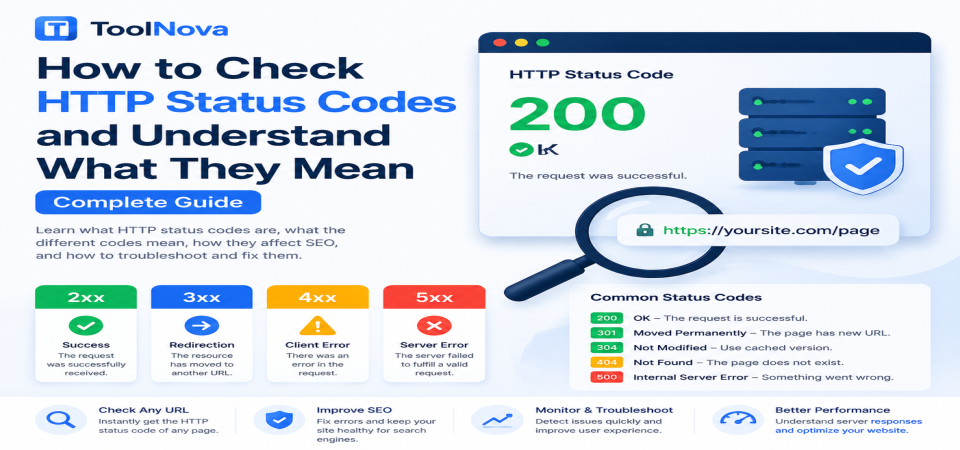
This guide explains what HTTP status codes are, what each category means, the most important codes website owners should know, how they affect SEO, and how to check and fix status code problems.
What Are HTTP Status Codes?
Every time someone visits a webpage, their browser sends a request to your server asking for specific content.
The server responds with two main things:
- The requested content (such as HTML, images, or files)
- An HTTP status code explaining what happened
A status code is a three-digit response that tells the browser, search engine crawler, or application whether the request succeeded or failed.
For example:
- 200 means the page loaded successfully.
- 301 means the page permanently moved somewhere else.
- 404 means the requested page does not exist.
- 500 means something went wrong on the server.
Browsers usually hide these codes because normal visitors do not need to see them. They become important when diagnosing technical problems.
The Five HTTP Status Code Categories
All HTTP status codes belong to one of five groups based on their first number.
1xx — Informational Responses
These codes indicate that a request was received and the process is continuing.
They are mainly used internally during communication between systems and rarely require attention from website owners.
2xx — Successful Responses
These indicate that the request was completed successfully.
For a normal webpage, this is the category you want.
Examples:
- 200 OK
- 204 No Content
3xx — Redirect Responses
These tell browsers and search engines that the requested resource has moved or that another action is required.
Redirects are not automatically bad. They are a normal part of managing websites.
Examples:
- 301 Permanent Redirect
- 302 Temporary Redirect
- 304 Not Modified
4xx — Client Errors
These mean the request itself has a problem.
The server is working, but something about the requested URL, permissions, or submitted data is incorrect.
Examples:
- 400 Bad Request
- 401 Unauthorized
- 403 Forbidden
- 404 Not Found
5xx — Server Errors
These indicate that the server failed while processing a valid request.
These problems usually require checking hosting, software, databases, or server configuration.
Examples:
- 500 Internal Server Error
- 502 Bad Gateway
- 503 Service Unavailable
- 504 Gateway Timeout
The Most Important HTTP Status Codes Explained
200 OK
Meaning: The request succeeded.
Example:
A visitor opens your homepage and it loads normally.
A 200 response tells browsers and search engines that the page is available and working correctly.
301 Moved Permanently
Meaning: A page has permanently moved to another URL.
Example:
You change:
example.com/old-pageto:
example.com/new-pageA 301 redirect sends visitors and search engines to the new location.
When to use 301 redirects:
- Changing URLs
- Moving to a new domain
- Combining similar pages
- Fixing outdated links
Using the correct redirect helps preserve SEO value from the old URL.
302 Found (Temporary Redirect)
Meaning: A page has temporarily moved.
Example:
A website temporarily redirects visitors during maintenance.
A common mistake is using 302 when a move is actually permanent.
For permanent changes, a 301 redirect is usually the correct choice.
304 Not Modified
Meaning: The content has not changed since the previous request.
This allows browsers to use cached files instead of downloading them again.
Example:
A returning visitor already has your CSS file stored locally, so the browser loads it from cache.
Benefits:
- Faster loading
- Less server usage
- Better performance
400 Bad Request
Meaning: The server cannot understand the request.
Common causes:
- Incorrect form data
- Invalid URL parameters
- Malformed requests
Example:
A broken application sends unexpected data to the server.
401 Unauthorized
Meaning: Authentication is required.
Example:
A user tries to access a private dashboard without logging in.
The solution is usually providing valid login credentials or fixing authentication problems.
403 Forbidden
Meaning: The server understands the request but refuses access.
Example:
A normal user tries accessing an administrator-only page.
Common causes:
- Incorrect permissions
- Security rules
- Blocked IP addresses
404 Not Found
Meaning: The requested page does not exist.
Common causes:
- Deleted pages
- Changed URLs
- Broken links
- Incorrect typing
Example:
A visitor clicks an old article link that no longer exists.
A few 404 errors are normal, but large numbers of unresolved 404 pages can create poor user experiences.
410 Gone
Meaning: The page existed but has been permanently removed.
Unlike 404, a 410 clearly tells search engines:
"This page is intentionally gone and will not return."
Useful examples:
- Removed products
- Expired campaigns
- Permanently deleted content
429 Too Many Requests
Meaning: Too many requests were sent in a short time.
Common causes:
- API limits
- Bots sending excessive traffic
- Incorrect scripts
The server temporarily blocks additional requests until the limit resets.
500 Internal Server Error
Meaning: Something failed on the server.
Common causes:
- Plugin conflicts
- Coding errors
- Database problems
- Incorrect configuration
Because 500 is a general error, checking server logs is usually necessary.
502 Bad Gateway
Meaning: A server acting as a gateway received an invalid response from another server.
Common causes:
- CDN problems
- Proxy issues
- Failed upstream servers
503 Service Unavailable
Meaning: The server is temporarily unavailable.
Common causes:
- Server overload
- Maintenance mode
- Resource limits
Unlike a permanent failure, 503 usually indicates a temporary problem.
504 Gateway Timeout
Meaning: A server waited too long for another server to respond.
Common causes:
- Slow database queries
- External API delays
- Server performance issues
How HTTP Status Codes Affect SEO
Search engines use status codes to understand how they should treat URLs.
Incorrect status codes can create SEO problems.
Examples:
Wrong 404 handling
If valuable pages disappear without redirects, they may lose existing search visibility.
Server errors
Frequent 5xx errors can make crawling more difficult because search engines repeatedly fail to access your pages.
Incorrect redirects
Using 302 instead of 301 for permanent changes may delay proper transfer of SEO signals.
The important point:
A single error will not destroy your rankings. Problems appear when errors become frequent, widespread, or unresolved.
How to Troubleshoot HTTP Status Code Problems
1. Identify the exact status code
Do not rely only on what the browser displays.
Different problems can look similar.
A slow page, a server error, and a missing page require completely different solutions.
2. Check if the problem is permanent or temporary
Ask:
- Does the error happen every time?
- Does it happen only sometimes?
- Did it start after a recent change?
3. Review recent changes
Common causes:
- New plugins
- Website updates
- Server changes
- URL changes
- Migration problems
4. Check server logs
For 5xx errors especially, server logs usually reveal the real cause.
How to Check HTTP Status Codes
Manually checking pages one by one is slow, especially on larger websites.
ToolNova's Website Status Checker allows you to enter any URL and view its actual HTTP response code.
You can use it to:
- Confirm whether a page returns 200, 404, or 500
- Verify redirects
- Check pages after migrations
- Troubleshoot unexpected errors
This helps separate real server problems from browser-related issues.
Common Mistakes Website Owners Make
- Using 302 redirects for permanent URL changes
- Redirecting every deleted page to the homepage
- Ignoring repeated 500 errors
- Forgetting to check redirects after migrations
- Leaving redirect chains unresolved
- Assuming a page works because it loads once
HTTP Status Code Prevention Checklist
Before publishing or changing your website:
✅ Check important URLs return 200
✅ Use 301 for permanent redirects
✅ Remove unnecessary redirect chains
✅ Monitor server errors
✅ Test URLs after migrations
✅ Review broken links regularly
✅ Check important pages with a status checker
Frequently Asked Questions
What does a 404 error mean?
A 404 means the server cannot find the requested page.
The page may have been deleted, moved, or the URL may be incorrect.
What is the difference between 301 and 302?
301 means permanent movement.
302 means temporary movement.
Use 301 when the old URL should permanently be replaced.
Why does my website show a 500 error?
A 500 error means something failed on the server.
Possible causes include code errors, plugins, databases, or configuration problems.
Is a 503 error permanent?
No.
A 503 usually means temporary unavailability caused by maintenance, overload, or resource problems.
How can I check my website status code?
Use an HTTP status checking tool that shows the actual server response, such as ToolNova's Website Status Checker.
Final Thoughts
HTTP status codes are not just technical numbers. They are messages from your server explaining what is happening behind every page request.
Learning how to read them helps website owners solve problems faster, protect SEO performance, and maintain a better experience for visitors.
Instead of guessing why a page is broken, check the status code first. It usually tells you where to start looking.



&media=https://chefnova.biz/assets/images/frontend/blog/6a8a139b710be1787433883.png)