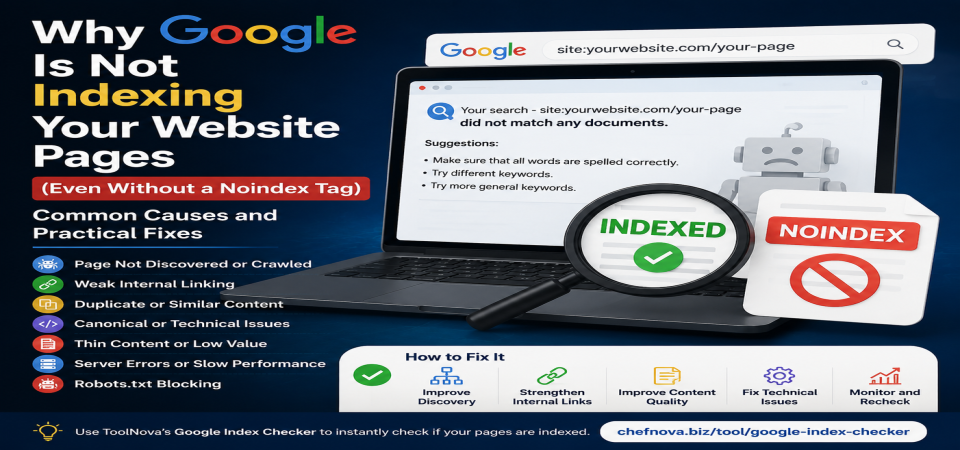
Why Google Is Not Indexing Your Website Pages (Even Without a Noindex Tag)
Why Google Is Not Indexing Your Website Pages (Even Without a Noindex Tag)
Meta Description:
Learn why Google is not indexing your website pages even without a noindex tag. Discover common indexing problems and practical solutions to help Google find and index your content.
You published a new page on your website. The content is ready, the page loads correctly, and you checked the source code — there is no noindex tag preventing search engines from showing it.
You wait. A few days pass. Then a few weeks.
When you search for the page on Google, nothing appears.
This situation confuses many website owners because the common advice is usually simple: "Remove the noindex tag." But what happens when there is no noindex tag in the first place?
The answer is that indexing depends on more than one setting. A page must first be discovered, then crawled, evaluated, and finally accepted into Google's index. Having no technical block only means Google is allowed to consider the page — it does not guarantee that the page will appear in search results.
Understanding the difference between these steps is the first step toward solving indexing problems.
Crawling, Indexing, and Ranking: What Is the Difference?
Many people use the words crawling, indexing, and ranking as if they mean the same thing. In reality, they describe three different stages of how Google handles a webpage.
Crawling
Crawling happens when Googlebot visits a URL and reads the available information on the page.
Google discovers URLs through:
- Internal links
- XML sitemaps
- External links from other websites
- Previously known URLs
If Google does not know a page exists, it cannot crawl it.
Indexing
Indexing happens after Google analyzes a crawled page and decides whether it should be stored in its search database.
A page that is indexed can appear in Google Search.
However, Google does not index every page it discovers. The search engine evaluates factors such as:
- Content usefulness
- Originality
- Technical accessibility
- Duplicate content signals
- Overall website quality
Ranking
Ranking happens after indexing.
A page can be indexed but still appear very low in search results because other pages provide stronger answers, have better authority, or match the search intent more closely.
This difference is important:
A page that is not ranking has a visibility problem.
A page that is not indexed has a discovery or evaluation problem.
Why No Noindex Tag Does Not Guarantee Indexing
A noindex tag is only one instruction that tells search engines not to include a page in their index.
It can appear in two main places:
- HTML meta robots tag
- HTTP response headers
For example:
name="robots" content="noindex"> Removing this instruction allows Google to consider the page again.
But it does not force Google to index it.
Think of it like submitting an application. Removing a restriction means your application can be reviewed, but it does not guarantee approval.
Google still needs to determine whether the page provides enough value and whether it can be accessed correctly.
Common Reasons Google Does Not Index Your Pages
1. Google Has Not Discovered the Page Yet
One of the simplest explanations is that Google does not know your page exists.
This happens frequently with:
- New websites
- New blog sections
- Pages without internal links
- Content published outside the sitemap
A page can exist perfectly on your server but remain invisible to Google if there is no path leading to it.
How to check
Open Google Search Console and use the URL Inspection tool.
If Google shows that the URL has not been discovered or crawled, the problem is discovery rather than content quality.
How to fix it
Make sure the page is:
- Included in your XML sitemap
- Linked from another relevant page
- Connected through your site's internal linking structure
For example, a new SEO article should not exist alone. Link it from related articles, category pages, or your main tools pages.
2. Weak Internal Linking
Internal links help Google understand the structure of your website.
A page with several relevant links pointing to it sends stronger signals than a page hidden deep inside the website.
A common mistake is publishing an article and expecting Google to find it automatically.
Search engines follow paths.
If a page has no links pointing toward it, Google has fewer signals that the page is important.
How to improve internal linking
Instead of creating isolated pages:
- Link related articles together
- Add links from category pages
- Mention useful tools inside relevant content
- Connect older content with new content
For example, an article about website indexing problems can naturally link to a Google Index Checker tool because readers may want to verify their pages.
3. Crawl Budget Problems
Crawl budget is often mentioned as a reason for indexing problems, but it is frequently misunderstood.
For small websites, crawl budget is usually not the main issue.
It becomes more important for:
- Large websites with thousands of pages
- Online stores with many product variations
- Websites generating many unnecessary URLs
Google has limited resources for crawling websites. If a large website contains many low-value pages, Googlebot may spend time on URLs that are less important.
Possible solutions
Large websites should:
- Remove unnecessary duplicate URLs
- Use proper canonical tags
- Fix redirect chains
- Prevent crawling of unimportant sections
For a small website, focus first on content quality, internal linking, and technical accessibility.
4. Canonical Tag Problems
Canonical tags tell search engines which version of a page should be considered the main version.
They are useful when similar pages exist, but incorrect canonical settings can create indexing problems.
For example:
You publish:
example.com/new-seo-guideBut the canonical tag points to:
example.com/old-seo-guideGoogle may decide that the old page is the preferred version and ignore the new one.
How to check
Review the page source or use Google Search Console's URL Inspection tool.
Compare:
- Your declared canonical URL
- Google's selected canonical URL
How to fix it
Make sure important pages use:
- Correct canonical URLs
- Self-referencing canonicals when appropriate
- No accidental references to old or test pages
5. Duplicate or Similar Content
Sometimes Google discovers your page, crawls it correctly, and still decides not to include it in the index because the content is too similar to another page.
Google does not want to show multiple versions of almost identical content in search results. When several pages provide the same information, Google may choose one version as the main result and ignore the others.
Common examples include:
- Similar blog articles covering the same topic
- Product pages with only small differences
- Printer-friendly versions of pages
- URLs with tracking parameters
- Category and tag archive pages
How to check
Compare the page with other pages on your website.
Ask:
- Does this page provide something unique?
- Does it answer a different user need?
- Would a visitor learn something new from this page?
How to fix it
Improve the page by adding unique value:
- Original examples
- Detailed explanations
- Practical steps
- Updated information
- Different perspectives
If two pages have almost the same purpose, combining them into one stronger page is often better than keeping both.
6. Thin Content or Low-Value Pages
A page does not need to be thousands of words long to be useful.
However, pages that provide very little information or simply repeat what already exists online may struggle to get indexed.
Examples of low-value content include:
- Very short pages with no useful details
- Pages created only to target keywords
- Automatically generated text without additional value
- Pages that answer a question but provide no practical help
Google's goal is not to index the largest number of pages possible. Its goal is to provide users with helpful results.
How to evaluate your content
Before publishing, ask:
- Does this page solve a real problem?
- Does it explain something better than existing pages?
- Does it include examples or practical advice?
- Would a visitor find it worth saving or sharing?
How to improve it
Add information that cannot be found everywhere:
- Real examples
- Step-by-step instructions
- Screenshots when needed
- Common mistakes and solutions
- Expert explanations
A useful 800-word guide can be stronger than a 3000-word article filled with unnecessary text.
7. Technical Problems Preventing Google From Understanding Your Page
Sometimes the content is good, but technical issues prevent Google from seeing it correctly.
Common problems include:
- Important content loaded only through JavaScript
- Blocked CSS or JavaScript files
- Broken page templates
- Incorrect redirects
- Pages showing different content to users and search engines
How to check
Use Google Search Console's URL Inspection tool and review how Google sees the page.
Check:
- Can Google access the URL?
- Is the page rendered correctly?
- Are important sections visible?
How to fix it
Make sure your website:
- Provides important content in the HTML
- Does not block necessary resources
- Uses clean and consistent URLs
- Avoids unnecessary redirects
8. Server Response Errors
Your website server plays an important role in indexing.
If Googlebot repeatedly encounters problems such as:
- 500 server errors
- Timeouts
- Connection failures
- Extremely slow responses
Google may reduce crawling activity because it cannot reliably access your website.
How to check
Review:
- Google Search Console crawl reports
- Server logs
- Website monitoring tools
You can also check whether your pages return the correct HTTP status codes using ToolNova's Website Status Checker:
https://chefnova.biz/tool/website-status-checker
How to fix it
Possible solutions include:
- Improving hosting performance
- Fixing database problems
- Optimizing heavy scripts
- Reducing server response time
A stable website gives search engines more confidence when crawling your pages.
9. Robots.txt Blocking Your Pages
A common misunderstanding is checking only for a
noindextag.A page can have no noindex instruction and still have indexing problems because it is blocked in
robots.txt.The difference is:
-
noindextells Google: "Do not include this page in search results." -
robots.txttells Google: "Do not crawl this URL."
If Google cannot crawl a page, it cannot properly evaluate its content.
How to check
Visit:
yourdomain.com/robots.txtLook for rules that may block important pages.
Example:
Disallow: /blog/This would prevent crawling of all pages inside the blog folder.
How to fix it
Remove unnecessary blocking rules.
Be careful with broad rules because one incorrect line can accidentally block hundreds of pages.
10. Slow Website Performance
Website speed is not usually the only reason a page is not indexed, but poor performance can make crawling less efficient.
A slow website may cause:
- Longer crawl times
- Failed requests
- Fewer pages crawled during a visit
Common causes include:
- Large unoptimized images
- Too many scripts
- Slow hosting
- Poor website configuration
How to improve performance
Focus on the biggest problems first:
- Compress images
- Remove unnecessary scripts
- Use caching
- Improve server response time
A faster website creates a better experience for both visitors and search engines.
A Practical Indexing Troubleshooting Checklist
Before requesting Google to index your page, check these points:
✅ The page returns a normal 200 status code
✅ The URL is not blocked by robots.txt
✅ There is no accidental noindex tag
✅ The canonical tag points to the correct URL
✅ The page is included in your sitemap
✅ Other pages link to it internally
✅ The content provides unique value
✅ The page loads correctly on mobile and desktop
✅ Important content is visible without technical problemsFixing these issues first is usually more effective than repeatedly requesting indexing.
How To Check If Google Has Indexed Your Pages
Instead of guessing whether a page appears in Google, you can check its indexing status directly.
A simple way is searching:
site:yourdomain.com/page-urlHowever, checking many pages manually can become difficult.
ToolNova's Google Index Checker helps website owners quickly verify whether specific URLs are indexed:
https://chefnova.biz/tool/google-index-checker
It can be useful when:
- Launching a new website
- Publishing multiple articles
- Checking pages after a redesign
- Reviewing indexing problems
If a page is not indexed, the next step is not always submitting it again. First investigate whether the problem is technical, structural, or related to content quality.
Google Indexing vs Ranking: A Common Confusion
Many website owners say:
"My page is not ranking."
But sometimes the real problem is that Google has not indexed the page yet.
The difference:
Not indexed:
Google does not include the page in its search database.Indexed but not ranking:
Google knows the page exists, but it does not consider it competitive enough for important searches.These situations require different solutions.
Indexing problems require technical and content checks.
Ranking problems require improving:
- Search intent matching
- Content quality
- Website authority
- User experience
Frequently Asked Questions
Why is my new website page not showing on Google?
A new page may not appear because Google has not discovered it yet, the website has weak internal links, or the page needs improvement before being added to the index.
Make sure the page is included in your sitemap and linked from other relevant pages.
Does removing noindex automatically make Google index my page?
No.
Removing noindex only removes one restriction. Google still needs to crawl, evaluate, and decide whether the page should be included in its index.
How long does Google take to index a page?
There is no guaranteed time.
Some pages may be discovered quickly, while others can take longer depending on website size, internal links, crawl frequency, and content quality.
Does submitting a sitemap guarantee indexing?
No.
A sitemap helps Google discover URLs, but it does not guarantee that every submitted page will be indexed.
Google still evaluates each page individually.
Can a page be indexed but not appear in search results?
Yes.
A page can be indexed but rank very low, meaning it may not receive noticeable traffic.
Indexing and ranking are two different stages.
Final Thoughts
A missing page in Google Search is not always caused by a simple technical mistake like a noindex tag.
Successful indexing requires several things to work together:
- Google must discover the page
- The server must allow access
- The content must provide value
- The website structure must help search engines understand importance
When a page is missing from Google, investigate the cause instead of repeatedly requesting indexing.
With the right checks and tools, most indexing problems can be identified and fixed.




&media=https://chefnova.biz/assets/images/frontend/blog/6a8a0c1817b671787431960.png)