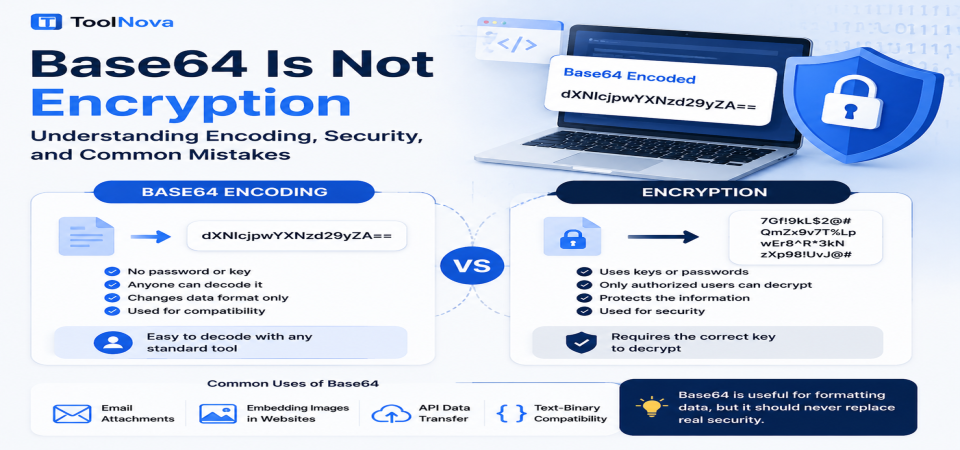
Base64 Is Not Encryption: Understanding Encoding, Security, and Common Mistakes
You may have seen a strange-looking string like:
dXNlcjpwYXNzd29yZA==
inside a configuration file, API response, or URL. It does not look like normal text, and many people assume that anything unreadable must be protected.
That assumption is one of the most common misunderstandings in web development.
The string above is an example of Base64 encoding. It changes the way data is represented, but it does not protect the information inside it. Anyone who understands Base64 can convert it back to the original content without needing a password, secret key, or special permission.
Base64 is a useful technology that appears everywhere in modern software, from email attachments to APIs and web applications. The problem is not using Base64 — the problem is expecting it to provide security.
This guide explains what Base64 actually does, how it differs from encryption, common mistakes, and when developers should use it.
What Is Base64 Encoding?
Encoding is the process of converting data from one format into another so it can be stored, transferred, or processed more easily.
Base64 is a type of encoding that converts binary data into a text format using a limited set of characters:
- Uppercase letters (A-Z)
- Lowercase letters (a-z)
- Numbers (0-9)
-
Special characters such as
+and/ -
The
=symbol for padding
The purpose of Base64 is compatibility, not security.
Many systems are designed to handle text more reliably than raw binary data. For example, email systems, APIs, and data formats such as JSON often work better with text-based values. Base64 allows binary information, such as images or files, to be represented as readable characters.
The process is completely reversible. A Base64 string can be decoded back into the original data because no secret information is involved.
Common Uses of Base64
Base64 is widely used in many technical situations.
Sending Binary Data Through Text-Based Systems
Some communication systems were originally designed to handle text only. Base64 allows files and binary information to be converted into a format that can safely travel through these systems.
A common example is email attachments, where files are encoded before being transferred.
Embedding Small Images in Websites
Developers sometimes use Base64 inside HTML or CSS to embed small images directly into a webpage.
Instead of loading a separate image file, the image data can be included inside the code as a data URL.
This can be useful for small icons or simple graphics, although it is not always the best choice for large images.
Transferring Data Through APIs
Many APIs exchange information using text-based formats such as JSON. Since JSON cannot directly store raw binary files, Base64 is often used to represent that data as text.
For example, an application may encode an uploaded file before sending it to another service.
In all these cases, Base64 solves a formatting problem — not a security problem.
Base64 vs Encryption: What Is the Difference?
The biggest confusion comes from treating encoding and encryption as the same thing.
They solve completely different problems.
Base64 Encoding
Base64:
- Does not use a password or security key.
- Can be decoded by anyone using a standard decoder.
- Changes only the format of the data.
- Does not hide information.
- Is designed for compatibility.
Encryption
Encryption:
- Uses cryptographic keys.
- Protects information from unauthorized access.
- Makes data unreadable without the correct key.
- Is designed for confidentiality and security.
A simple way to remember the difference:
Base64 changes how data looks. Encryption changes who can read it.
If someone finds a Base64 string, they can decode it. If someone finds properly encrypted data, they still need the correct key to understand it.
Why Do People Mistake Base64 for Security?
Base64 often looks secure because the result does not look like normal text.
A sentence converted into Base64 becomes a combination of random-looking characters, which creates the impression that the information has been protected.
However, appearance is not security.
Several common mistakes happen because of this misunderstanding.
Hiding API Keys in Front-End Code
Some developers encode API keys with Base64 before placing them inside JavaScript files.
This does not protect the key.
Anything sent to a user's browser can potentially be viewed. Base64 only hides the readable form temporarily; it does not prevent access.
Sensitive keys should be protected through proper server-side handling and authentication methods.
Storing Passwords Using Base64
This is one of the most dangerous mistakes.
A password converted into Base64 can simply be decoded back into its original form.
Base64 should never replace password hashing.
Passwords should be stored using dedicated password-hashing methods designed to make recovery difficult even if a database is exposed.
Protecting Private Information in URLs
Some websites encode information inside URLs using Base64 because the result looks less readable.
However, this does not make the information private.
If the data should not be visible to users, it needs proper access control or encryption — not encoding.
Correct and Incorrect Uses of Base64
Understanding when to use Base64 is more important than avoiding it completely.
Correct Uses
Email Attachments
Base64 allows files to be transferred through systems that expect text-based data.
API Data Transfer
Applications can use Base64 to send binary files or information inside text-based formats.
Small Embedded Images
Developers can include small images directly inside HTML or CSS when appropriate.
Incorrect Uses
Storing Passwords
Base64 does not protect passwords and should never be used as a replacement for password hashing.
Securing Private Data
Personal information, confidential files, and sensitive business data require real security methods.
Replacing HTTPS
Encoding data before sending it over an insecure connection does not protect it.
HTTPS uses encryption to secure communication between browsers and servers. Base64 does not provide this protection.
How to Decode and Test Base64 Safely
Because Base64 is designed to be reversible, testing it is simple.
If you find a Base64 string and want to understand what it contains, you can decode it and see the original data.
ToolNova's Base64 Converter allows you to:
- Encode text into Base64.
- Decode Base64 strings.
- Understand how Base64 conversion works.
You can use it for learning, testing, and checking whether a value is actually encoded data or something else.
ToolNova Base64 Converter:
https://chefnova.biz/tool/base64-converter
Remember: if decoding does not require a key or password, the data was never encrypted.
Frequently Asked Questions
Is Base64 encryption?
No. Base64 is an encoding method used to convert data into a text-compatible format. It does not protect information or prevent others from reading it.
Can Base64 be reversed?
Yes. Base64 is designed to be reversible. Any standard decoder can convert Base64 data back into its original form.
Is Base64 secure for passwords?
No. Passwords should never be stored using Base64. Proper password hashing methods should be used instead.
Why use Base64 if anyone can decode it?
Because its purpose is not security. It helps systems transfer and store binary data in text-based environments.
When should developers use Base64?
Developers should use Base64 when they need to represent binary data as text, such as API transfers, email systems, or small embedded resources.
Final Thoug
Base64 is a useful and widely used technology, but it is important to understand what it was designed for.
It solves a compatibility problem by converting
Using Base64 correctly can make applications easier to build and maintain. Using it as a security solution can create serious risks.
When information needs protection, use real security methods such as encryption, authentication, and proper access controls. Base64 should remain what it was designed to be: a reliable way to represent data, not a way to secure it.
SEO Title:
Base64 Is Not Encryption: Encoding vs Security Explained
Meta Description:
Learn why Base64 is not encryption, how encoding differs from security, common mistakes, and when to use Base64 correctly in web development.